Stop Managing Tools.
Just Tell AI What You Need.
Projects, tasks, meetings, docs, and a client dashboard — all in one app. Just tell the AI what you need in plain English and it gets done.
Connect with Your Favorite Tools
CollaboraOne integrates seamlessly with the tools you already use to keep all your work connected.

Platform Walkthrough
Platform Overview & Bulk Task Creation
A quick overview of the platform — reading a document and instantly creating 10 tasks from it.
Smart Meeting Scheduling with AI
Creating a meeting with AI, which detects a scheduling conflict and reschedules automatically.
Document Summary & Task Kickoff
Uploading a document, getting an AI-generated summary, and creating 3 initial tasks from it.
AI Translation & Task from Chat
Translating a client's message via AI and then creating a task directly from the conversation.
Client Dashboard Overview
A quick walkthrough of the client dashboard — how clients view project updates, files, meetings, and chat.
Hello, Sarah 👋
Here's what's happening with your project.

Notifications
Your Clients Get
Their Own Dashboard.
Clients log in to see project updates, shared files, upcoming meetings, and chat with you — without seeing your internal work. No extra tools needed.
Share Files Instantly
Upload a file and your client sees it right away.
Live Project Status
Clients can check how their project is going — anytime.
Direct Chat
Message your clients right inside the app. No emails needed.
Join Meetings
Clients can see and join scheduled meetings from their dashboard.
One App to Run Your Work
Stop juggling multiple tools. Manage projects, tasks, meetings, documents, and client communication — all from one place.
Projects
Create projects, add your team and clients, and track everything on a visual board.
Tasks
Drag-and-drop tasks with priorities, due dates, and assignments.
Meetings
Schedule and join video calls right from your dashboard.
Documents
Upload and share files with your team and clients securely.
Team Chat
Message your team and clients directly inside the app.
AI Assistant
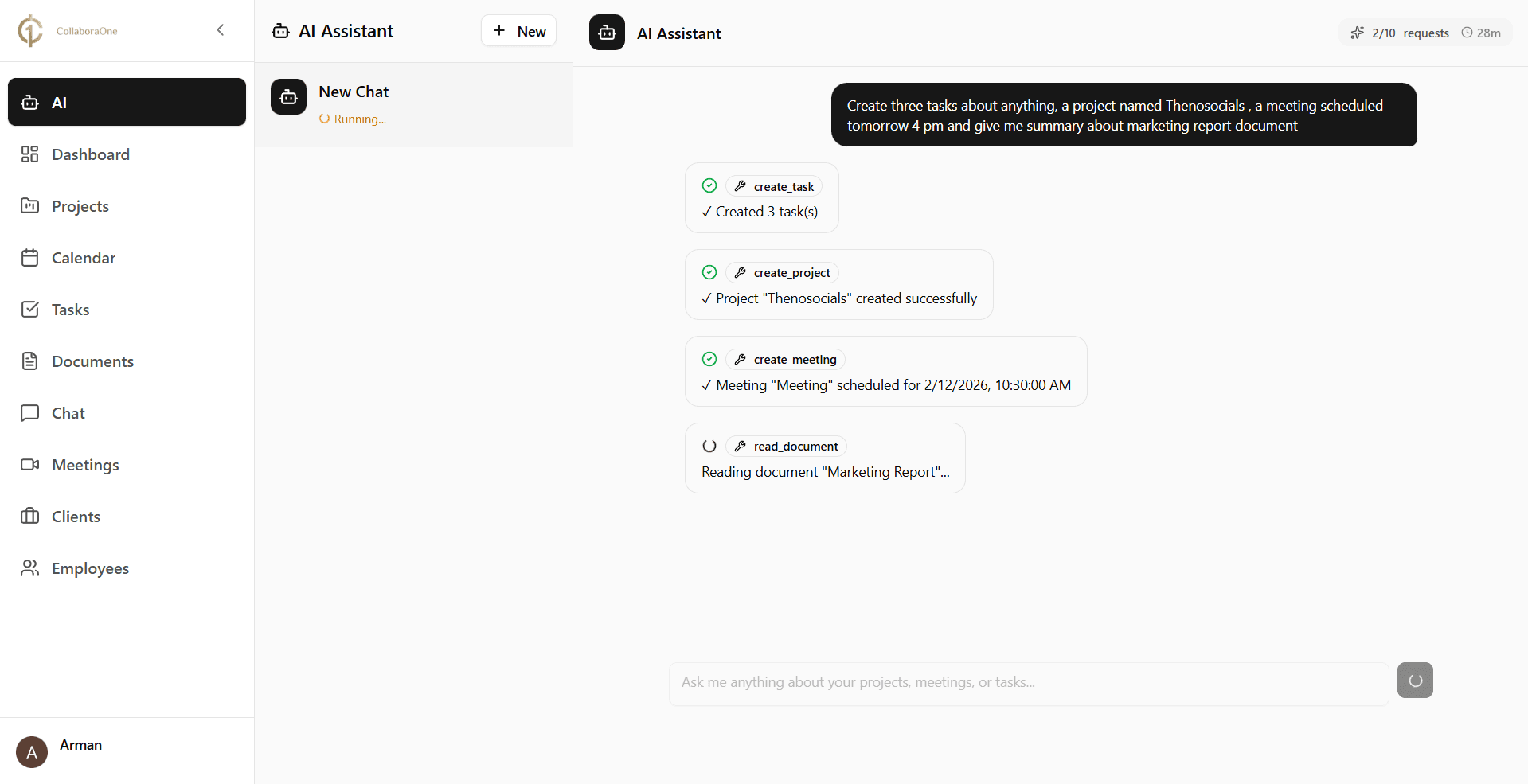
Just type what you need — AI creates tasks, schedules meetings, and reads docs for you.
Slack Communication
Stay updated via Slack. Message directly from the app, view uploaded files natively, and soon, manage tasks using /commands. Automate notifications to specific channels instantly.
Google Drive Management
Upload, download, and organize Drive files without leaving CollaboraOne. Create new folders to manage your workspace, and preview files directly within the platform.
Just Type It.
AI Handles It.
Create 20 tasks at once, schedule meetings based on everyone's availability, or summarize a document — just describe what you need in plain English.
Extracted 5 key action items from "Q3 Marketing Strategy.pdf".
Friday, 14th @ 2:00 PM
Knows Your Projects
AI remembers your projects, team, and documents — so you don't have to repeat yourself.
Works Across Everything
Tasks, meetings, docs, chat — AI handles them all from one prompt.
Bulk Actions
Create 50 tasks or schedule 10 meetings in a single sentence. Save hours of manual work.
Built for People Who Run Client Work
Whether you're a solo freelancer or a growing agency — CollaboraOne helps you manage clients, projects, and your team in one place.
Freelancers & Agencies
Run your business from one place.
Manage clients, projects, and team members. Send invite links — they sign up and they're in. Use AI to save hours on repetitive work.
Your Clients
- Own dashboard to track progress
- View shared files & meetings
- Chat directly with your team
Up and Running in 2 Minutes
No complicated setup. No training needed. Just sign up and go.
Sign Up
Create your account and your workspace is ready instantly.
Invite Your People
Share a link with your team and clients. They sign up and they're in your workspace.
Start Working
Create projects, assign tasks, chat, meet, share files — or just tell AI to do it for you.
See All Your Tasks at a Glance
Drag and drop tasks between columns. Always know what's new, in progress, or done.
Drag & Drop
Move tasks between columns by simply dragging them
Set Priorities
Mark tasks as low, medium, or high priority so your team knows what matters
Assign to Anyone
Give tasks to team members and they get notified right away
Be One of Our First Reviewers
We're building CollaboraOne in the open. Join the beta, try it out, and help us shape the product with your feedback.
Simple, Honest Pricing
AI assistant included in every plan. No hidden fees. Start with a 3-day trial.
Starter
- 700 AI Credits
- Up to 5 Team Members
- Up to 5 Clients
- 5 Active Projects
- Unlimited Tasks
- 10 Video Meetings
- Basic Integrations
- Basic Support
Professional
- 1,500 AI Credits
- Up to 10 Team Members
- Up to 10 Clients
- 10 Active Projects
- Unlimited Tasks
- 20 Video Meetings
- Advanced Integrations
- Priority Support
Business
- 4,000 AI Credits
- Up to 20 Team Members
- Up to 20 Clients
- Unlimited Active Projects
- Unlimited Tasks
- 40 Video Meetings
- Custom Integrations
- 24/7 Dedicated Support
Frequently Asked Questions
Got questions? We've got answers.
Your data is safe. All your projects, tasks, documents, meetings, and client information will remain fully intact after the trial period ends. We will notify you in advance of any changes.
CollaboraOne's AI can read your projects, documents, and tasks to understand your work context. You can ask it to create tasks, schedule meetings, summarize documents, or handle bulk actions — all in plain English. It works across everything inside CollaboraOne so you don't have to repeat yourself.
Clients receive a dedicated invite link from you. They sign up through that link to create their own account and are then granted access to their personalized client dashboard — separate from your internal workspace.
The AI has access to your projects, documents, and tasks within CollaboraOne. This allows it to understand the full context of your work and take meaningful actions without you having to explain everything from scratch.
Yes, limits depend on your chosen plan. Each plan specifies the number of team members and clients you can invite. You can check the Pricing page for details on what each plan includes.
Video meetings in CollaboraOne are powered by Stream.io, a reliable real-time communication infrastructure. You can schedule and join meetings directly from your dashboard without any third-party app.
Yes! CollaboraOne is fully accessible on mobile devices. You can manage projects, chat with your team, check tasks, and more — all from your phone or tablet.
Clients only see what's relevant to them: files you've shared with them, scheduled meetings, approval requests, and the chat thread with your team. They cannot see your internal tasks, team conversations, or any other workspace data.
Yes! Slack and Google Drive integrations are available right now. You can manage files and chat directly from our dashboard. More integrations (like Notion, GitHub, etc.) are coming soon. You can submit your integration requests and we'll build what matters most to you.
The AI doesn't just run on its own — it clarifies what you mean first, then takes action. Think of it as a smart assistant that checks with you before doing anything, so nothing gets done by accident. You stay in control, without having to micromanage.
Have more questions? Reach out to us at support@collaboraone.com
Get in Touch
We'd love to hear from you. Send us a message and we'll respond as soon as possible.